‏إظهار الرسائل ذات التسميات Google Chrome. إظهار كافة الرسائل

OpenAI To Develop Its Own Web Browser to Take on Google Chrome

OpenAI to Develop Its Own Web Browser to Take on Google Chrome

OpenAl is reportedly considering developing its own web browser to rival Google Chrome. This potential move reflects OpenAl's ambition to expand its footprint beyond Al development, leveraging its technological expertise to disrupt established industries.

The planned new browser would integrate OpenAl's advanced language models, such as GPT, directly into the browsing experience, offering users intelligent search and assistance capabilities. Features like automated summarization, real-time translation, and context-aware search could set the browser apart.

Further, OpenAI's proposed web browser would emphasize privacy and personalization to differentiate itself from existing browsers like Google Chrome. The new browser will reportedly have enhanced encryption protocols to ensure that user data is protected. With Minimal Data Collection, the proposed OpenAI browser would have commitment to collect only essential user data, with a focus on user consent and transparency.

OpenAl has already discussed plans with several website and app developers, including Condé Nast, Redfin, Eventbrite, and Priceline, to build the web browser.

OpenAI is also in talks with Samsung to integrate its Al features into Samsung devices, which could challenge Google's stronghold in the mobile market. The Samsung collaboration aims to bring features like ChatGPT and other AI technologies to millions of Samsung users, potentially rivaling Google Assistant. The partnership could also extend to Samsung's upcoming AR smart glasses and other device.

To recall, messaging app Telegram launched its own in-app browser, in August this year, that supports multiple tabs, making Web3 available to almost a billion users. It also launched a Mini App Store.

Notably, several tech companies are working on new and innovative web browsers to challenge the dominance of existing ones like Google Chrome and Safari.

Arc 2.0, by The Browser Company, is a browser designed to be more than just a web browser, aiming to become a user's primary computing interface. It integrates AI to streamline browsing processes, such as renaming downloads, summarizing web content, and allowing users to ask ChatGPT questions directly from the URL bar.

Browsers like Google Voice Control, Mozilla Scout, and LipSurf are expected to become mainstream, offering a new way to browse the web using voice commands.

Besides the new browser, OpenAl is also developing a new series of reasoning models called OpenAl 01, designed to solve complex problems in science, coding, and math. These models are trained to spend more time thinking through problems before responding, similar to how a human would.

Hungarian Startup Lazy Felix Just Entering India Might Change the Way India's Chrome Users Use the Internet Forever

Lazy Felix
Lazy Felix Launches Innovative Chrome Extension for Streamlined Image Management for India's English-Speaking & Tech-Savvy Market

Hungarian startup, Lazy Felix, proudly announces the launch of its innovative Chrome extension, specifically designed to simplify and streamline the process of managing images for India's vast English-speaking and tech-savvy population. This free and user-friendly add-on promises to significantly enhance the efficiency of professionals like teachers, doctors, journalists, marketers, as well as everyday internet users across the country.

India is home to a rapidly growing community of English-speaking, technologically adept individuals who are constantly seeking tools to improve their online experience. The Lazy Felix Chrome extension is poised to become an indispensable tool for this demographic, eliminating the tedious download-upload cycle typically associated with image management.

András Györfi, the founder of Lazy Felix, enthusiastically states, "Our Chrome extension is not only incredibly easy to use but also has the potential to revolutionize how India's tech-savvy English-speaking population interacts with images online. We are thrilled to introduce Lazy Felix to this vibrant market and look forward to seeing the positive impact it will have on millions of users."

Lazy Felix

The Lazy Felix Chrome extension available on www.lazyfelix.com offers a seamless and intuitive user experience. After installing the extension, users can hover over an image, click on the cat's paw icon that appears, and mark the selected file. The Lazy Felix panel, accessible from the upper right corner of the browser window, displays all marked images, making it simple to insert them into emails, Facebook posts, or other digital platforms without the need to download and re-upload files.

In addition to streamlining image management, Lazy Felix allows users to organize marked images into folders, catering to both work and personal needs. This organizational feature ensures that users can easily locate and access images, boosting productivity and minimizing the time spent searching for specific files.

Moreover, the Lazy Felix Chrome extension is committed to delivering a user-friendly experience that is accessible to all. A comprehensive tutorial video, available in English, ensures that users can easily understand and utilize the extension to its full potential, even without prior knowledge of the language.

With digital technology becoming increasingly ingrained in everyday life, the Lazy Felix Chrome extension is well-positioned to become an essential tool for India's tech-savvy English-speaking community. Its simple yet powerful features have the potential to significantly improve the digital experience for millions of users in the region.

The Lazy Felix Chrome extension is now available for free on the Chrome Web Store, ready to transform the digital landscape for India's internet users. Don't miss the opportunity to enhance your online experience with this ground-breaking tool.

The video below explains the working of the extension:


The extension can be added to Chrome from the Google Webstore, here:

https://chrome.google.com/webstore/detail/lazy-felix/ndabodbljahojbefpjklnmkghopppccg?hl=hu

For more information about Lazy Felix and its revolutionary Chrome extension, visit www.lazyfelix.com

Now Edit PDF Documents Directly on Google Chrome Browser


Adobe has rolled out an update to Google Chrome's Acrobat extension. Post this update, users will be able to edit PDF files within the browser itself. Earlier the extension only allowed users to view, copy and perform various other tasks on PDF documents.

The updated extension is simply called “Adobe Acrobat” and is automatically added to Google Chrome while installing the security update, though it require users to enable it when launching the browser.

Also available on Microsoft Edge, the new Adobe Acrobat PDF tools solve a age-old problem for users everywhere, allowing a much smoother way to view and edit PDF documents directly in the browser.

Uptil now users had to either open a new app on the desktop or search a web-app to edit PDF. But now with this new update, users can comment, mark up, fill in, and do more, including sign in, on PDF files directly from the browser window.

The updated extension will also allow users to rotate, delete, or reorder PDF pages to optimise viewing and printing, transform a PDF to a Microsoft Word document and retain formatting. You'll also be able to convert web pages into PDF, preserving layout, formatting, and links - saving major headaches for users everywhere.

However, if you want to delete certain pages from PDF file then membership is required. According to the particular support page, the new features were made available sometime in August. But the company is now showing extra tools.

Play Soccer anywhere with new KickWithChrome Game Experiment

On occasion of this world cup football season, Google has revealed a new Chrome Experiment that combines your phone and your desktop/laptop Chrome browser as a controller for two-player footie action, you try it yourself at Kick With Chrome.

The game/experiment uses chrome browser users which uses existing technologies that means no apps and no downloads. All you need is a device running Chrome and you're ready to play.

In Kick with Chrome, you can play three different games: Infinite Dribble, Space Kick, and Shootout. In Infinite Dribble, tilt your phone or tablet to dodge defenders and roadblocks. Kick the ball high in the sky in Space Kick. Or kick and block penalty shots in the best-of-three game Shootout.

kick with chrome screen

Google has used latest mobile web platform technologies, your phone or tablet is always your game controller in Kick with Chrome, and you can play with or without your desktop computer. Web technologies like WebRTC DataChannel and WebSockets enable the real-time mobile-to-desktop connection, and the HTML5 Fullscreen, Accelerometer and Vibration APIs create the rich mobile web experience. Just open Chrome on your Mac or Windows laptop, Android phone or tablet, iPhone or iPad and you can play this game right away.

Learn to speak english with Google's new 'Spell Up' Game

Google lately has released a new word game and Chrome Experiment called - Spell Up, it helps you improve your English using your voice and any modern browser. This word game and Chrome experiment is made possible using Web Speech API.

Spell Up is a new voice-powered game that can help correct and improve your spelling skills. Using a combination of different web technologies, the chrome browser will understand what you say and use it to control the game action.

To interact with the game all you need is modern browser with microphone and speakers. The goal of the game is to correctly spell the words you hear and stack them to build the highest word tower you can—letter by letter, word by word. The higher the tower gets, the more difficult the word challenges: You’ll be asked to pronounce words correctly, solve word jumbles and guess mystery words. You can earn bonuses and coins to level up faster.

As stated in official Google blog, Spell Up works best in Chrome browser on your computer and on Android phones and tablets. It also works on iPhones and iPads, but you’ll need to type rather than talk.

Notably and interestingly the other news is that Google launched this as a worldwide program to collect utterances of non native english-speaking people so as to collect how people speak different words which in future would give case-studies and enough example materials to improve and conceptualize the better voice search in Google.

Google Chrome Comes Out of Beta for Mac, Linux and Fastest Version or Windows

Google Chrome Comes Out of Beta for Mac, LinuxGoogle Chrome today introduced stable (out of beta) release of Chrome browser for Mac and Linux and as announced on official blog its the fastest Chrome version yet along with most significant speed improvements.

The new Chrome stable version also host few new features as well along with inclusion of HTML 5 features and new bookmark manager build with HTML 5.

The new features includes synchronization of your bookmarks and browser preferences across multiple computers including themes, homepage and startup settings, web content settings, preferred languages, and even page-zoom settings.

HTML 5 among the new features Chrome provides support for features such as Geolocation APIs, App Cache, web sockets, and file drag-and-drop. To test the HTML 5 features in Chrome, one may browse websites built with HTML5 such as scribd.com, Gmail's dragging and dropping attachments and enabling the geolocation functionality in Google Maps.

The incorporation of HTML 5 features are gradually being added to all modern browsers such as Firefox, Safari, Opera and Chrome and now Google Chrome being the one that has added few more. IE however has been started with IE 8 version onwards with minimal features though, however there is strong commitment from Microsoft for strong support if CSS3/ HTML5 in its IE 9 version.

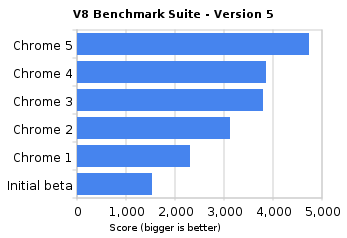
https://blogger.googleusercontent.com/img/b/R29vZ2xl/AVvXsEioQGd2WfuM0GdfGr0GyGheXlP0orTsDRXN1U9Ww6H_zP59iCSCS083VmaXm1vgYHatp-dpz4bRB1_4jU-cfZfvQ1g00MphaZ8-WLMTetfVaqxzi5C2RNpk-T3fByjOqp8A4y0OMN35ajxQ/s1600/v8_benchmark_suite_-_version_5.pngGoogle Chrome also experimenting with Flash Player integration in the browser which is yet not included by default with this stable version however it is expected to be enabled with full release of Flash Player ver. 10.1 soon in next version onwards.

Google Chrome team concluded that in short span of time i.e. since its first beta release back in September 2008 Chrome has improved by 213 percent and 305 percent in Javascript performance by the V8 and SunSpider benchmarks. The conclusion is an outcome of series of interesting speed tests for which see video below which is filmed at actual web page rendering times.

Market Reports

Market Report & Surveys
IndianWeb2.com © all rights reserved