


Telegram Messenger has launched multiple new features in its latest update which includes easy-to-make video stickers, better reactions with compact animations and extra emoji, a button to review unseen reactions and improved navigation between chats. The updates are targeted towards improving the user experience and giving them more options to express themselves on the platform.
The new update also brings improved call quality, added support for translation to Instant View pages (and bios on iOS), and the option to send silent messages from the sharing menu. The iOS version also has new animations which can be explored by tapping icons in the tab bar.
For more information, please visit to Telegram’s latest blog:
https://telegram.org/blog/video-stickers-better-reactions
Pavel Durov’s Blog:
https://t.me/durov
Video Sticker
 |
With an unmatched quality and efficiency, the stickers introduced by Telegram support for converting stickers from regular videos. Since creating such stickers requires experience and specialized software, the support from Telegram gives the flexibility to the consumers for creating their own pack or add new sets made by others. Further developers can use the Sticker Import API to build powerful apps for creating and importing stickers to Telegram.
 |
Better Reaction and Interactive Emoji
 |
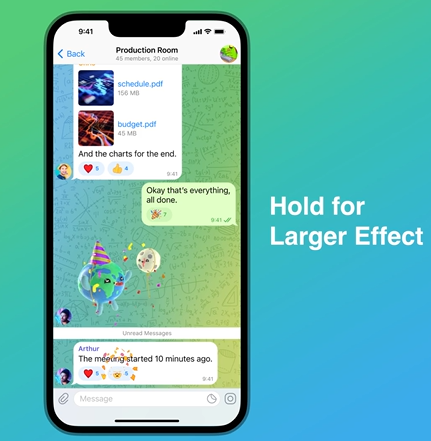
Telegram has made reactions better by giving them the shape of compact animations. The interactive emojis are now synchronized, and the recipients will see the animations in real time. The update has also added 5 new reactions can also be accessed via full screen effect.
Navigating Recent Chats
The consumers can now hold the 'Back' button to return to a specific chat. Further, consumers can easily navigate through chats through opening chats from forwarded messages, links, usernames, profiles, etc.Bug Busting and More
 |
For more information, please visit to Telegram’s latest blog:
https://telegram.org/blog/video-stickers-better-reactions
Pavel Durov’s Blog:
https://t.me/durov


 The Telegram messenger has also provided a new Cache memory management tool directly to clean-up the storage as per the user requirement. An user need to go to the settings > Data and Storage > Storage usage to see how much storage is used by the files from Telegram divided into segments like Photos, Documents, Music, Voice/ Video messages, Animated stickers and other files. They can also select on a scale from when they want to keep their previous data ranging from 3 days to forever. This will only delete unassessed files which can also be re-downloaded later from the Telegram cloud. A user can also clear the local data base where texts of cached messages will be compressed to save space on the internal disk.


 IndianWeb2.com is an independent digital media platform for business, entrepreneurship, science, technology, startups, gadgets and climate change news & reviews.
